A new firmware for the Atari Eiffel Pico USB is available here : Release Atari-st-rpikb v9.0.2
Better joystick fire button handling
The left USB mouse button now emulates joystick firing in all configurations, not just when Joy0 is set to “USB”.
A simpler navigation
The different pages of the interface have been reorganized into menus:
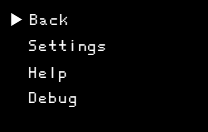
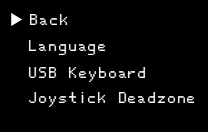
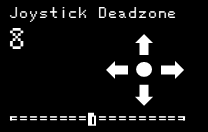
Added joystick dead zone setting
USB joysticks now feature a dead zone adjustment, with visual testing:
Download firmware Atari-st-rpikb v9.0.2
There is a new User manual for version 9.0.2
To update the firmware:
- Disconnect the USB flat cable from the Pico
- Connect the Pico to your PC or Mac while holding down the "BOOTSEL" button. The Pico should behave like a USB flash drive,
- Drag the atari_ikbd_v9.0.2.uf2 file into the Pico folder; it will update automatically.
- Reconnect the flat USB cable to the Pico.